Desktop GPIO with MCP2221A
When I first began constructing the GPIO character device in 2015 I had the vision that it would make it simple to use GPIO expanders on desktop Linux, perhaps for industrial purposes.
So ~10 years later, did this work out as planned? Let's see.
I got myself a simple GPIO expander using the Microchip MCP2221A USB-to-I2C-and-some-GPIO chip. It is actually using the USB HID device class and just adds GPIO support under that as a sideshow to the I2C and UART functionality it provides. The initial driver for Linux by Rishi Gupta looked promising, and he quickly followed up with support for the 4 GPIO pins on the chip.
I obtained this a while back, but it didn't “just work”, because like with some RS232-with-GPIO adapters, this thing contains a NVRAM that hard-configures these GPIO lines for other purposes, such as voltage readings. Actually, Matt Ranostay added support to use the ADC/DAC in the device through the IIO subsystem! This is quite a feat.
Toolset
The GPIO commands that I use here, such as gpiodetect and gpioset commands that you see here is part of libgpiod, a GPIO library and utility set that is available on most distributions. In my case using Fedora it was a simple matter of dnf -y install libgpiod-utils to get it.
libgpiod uses the GPIO character devices exclusively, no funny hackery, so in my case it's these that are actually used to communicate with the GPIO controller:
# ls /dev/gpiochip*
/dev/gpiochip0
/dev/gpiochip1
/dev/gpiochip2
So using gpiodetect I could see the GPIOs where there:
# gpiodetect
gpiochip0 [AMDI0030:00] (256 lines)
gpiochip1 [ftdi-cbus] (4 lines)
gpiochip2 [mcp2221_gpio] (4 lines)
Here we see the computer's built-in GPIOs that I could probably access by soldering into my desktop computer (brrrr!), then there are the 4 lines on an RS232-converter I am using, but it is molded into plastic and these are not easily accessible, also these are resticted by NVRAM inside the RS232 adapter:
# gpioset -c gpiochip1 --toggle 1000 0=1
gpioset: unable to request lines on chip '/dev/gpiochip1': Device or resource busy
So rumor has it that to use the RS232 adapter GPIOs, some special tool is needed to modify the NVRAM.
Accessing the MCP2221
So let's use the MCP2221A device:
# gpioset -c gpiochip2 --toggle 1000 0=1
gpioset: unable to request lines on chip '/dev/gpiochip2': Device or resource busy
Bummer: I was still unable to “just use it for GPIO”, and was meaning to drill into the problem. Last summer Heiko Schocher beat me to it and implemented code to force the 4 GPIO pins into GPIO mode if and only if IIO was not in use, i.e. by definition the ADC/DAC functionality would take precedence.
Maybe this was a bad target. But I wanted something simple on USB that anyone can use, and the alternative would be to go and solder an RS232 adapter. Amazingly, there is no dedicated “give me many GPIOs on USB” adapter that I have found. There is gimme GPIO from Element 14, but it appears as a USB serial port (ttyUSB0) and then you have to talk a serial protocol to handle the GPIOs from userspace, and this is not what I want, I want the GPIOs to appear as a gpiochip on my Linux host, using the native GPIO character device and all. (It would probably be possible to write a Linux driver that uses Element14's device over serial, I haven't tried.)
A small puzzle piece was all that was needed for me to use this for GPIO on a common Fedora desktop: a module parameter to enforce the GPIO mode if GPIO is what you want to do for these 4 pins, and you're not really able to disable IIO (such as for a default desktop kernel...) And voilá, after this:
# rmmod hid_mcp2221
# insmod ./hid-mcp2221.ko gpio_mode_enforce=1
# gpioset -c gpiochip2 --toggle 1000 0=1
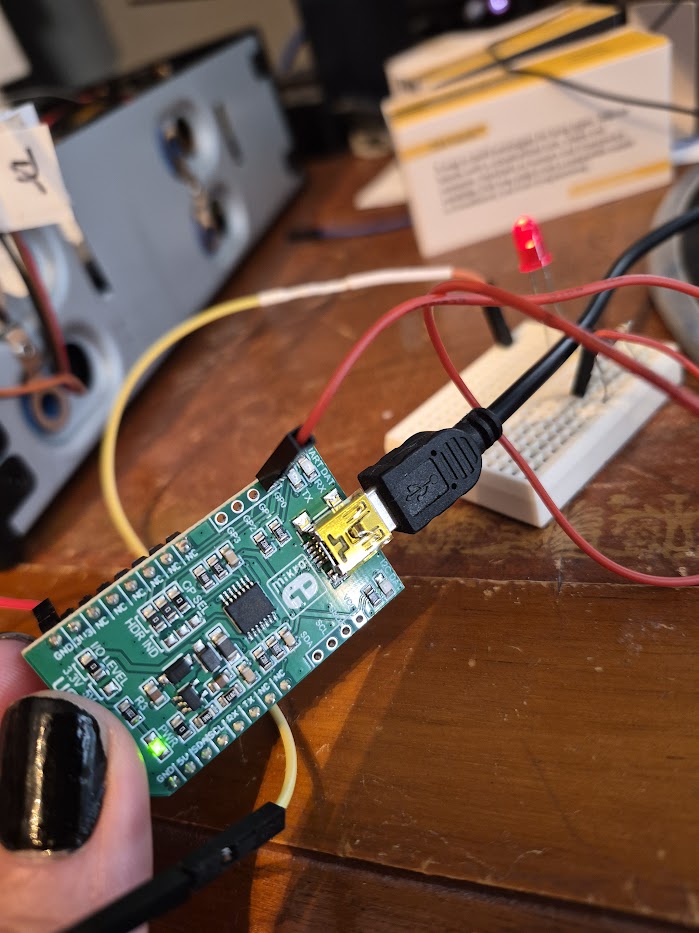
There it is! This LED now blinks with a period of 2 seconds (toggle between on and off every second). As you realize the parameter to the gpioset —toggle argument is in milliseconds.
In case you're wondering about the electronics, the LED is simply connected between the GP0 output and GND using a 220 Ohm resistor.
Future fixes
My patch to the MCP2221A driver was accepted.
To put it into constant GPIO mode you have to add a configuration file in /etc/modprobe.d/mcp2221.conf to pass the gpio_mode_enforce=1 parameter automatically when the device is probed, like this:
options hid_mcp2221 gpio_mode_enforce=1
Can this type of GPIO be used for industrial purposes? Pretty much yes. The libgpiod library and it's applications can be set to realtime deadline scheduling class, and this should (but please test!) ascertain very strict behaviour for such applications.
Unless you want to script things with the libgpiod utilities, libgpiod has C++, Python and Rust bindings, and it has glib bindings so doing GUI desktop applications using GPIO should be a walk in the park as well. So go and have fun.